အားလုံးပဲ မဂၤလာပါရွင့္။
ညီမကေတာ့ Spiceworks Myanmar မွာ Web Designer အေနနဲ႔ ဝင္ေရာက္လုပ္ကိုင္ေနတဲ့ ခင္ရတနာေအာင္ ျဖစ္ပါတယ္ရွင့္။ ဒီတစ္ပတ္ ညီမ မွ်ေဝေပးခ်င္တဲ့ အေၾကာင္းအရာကေတာ့ CSS properties ေတြျဖစ္တဲ့ animation, transform, transition တို႔ပဲ ျဖစ္ပါတယ္။ ဒီ CSS properties ေတြကို အသုံးျပဳၿပီးေတာ့ လြယ္ကူ႐ိုးရွင္းတဲ့ animation ေတြ စတင္ဖန္တီးၾကည့္လို႔ရပါတယ္။
Animation
animation property က element ကို ပုံစံ တစ္ခုကေန တစ္ခုကို တျဖည္းျဖည္း ေျပာင္းလဲေပးပါတယ္။
animation နဲ႔ ပတ္သက္ၿပီး ေလ့လာရမယ့္ properties ေတြကေတာ့ –
@keyframes
animation-name
animation-duration
animation-delay
animation-iteration-count
animation-direction
animation-timing-function
animation-fill-mode
animation တို႔ပဲ ျဖစ္ပါတယ္။
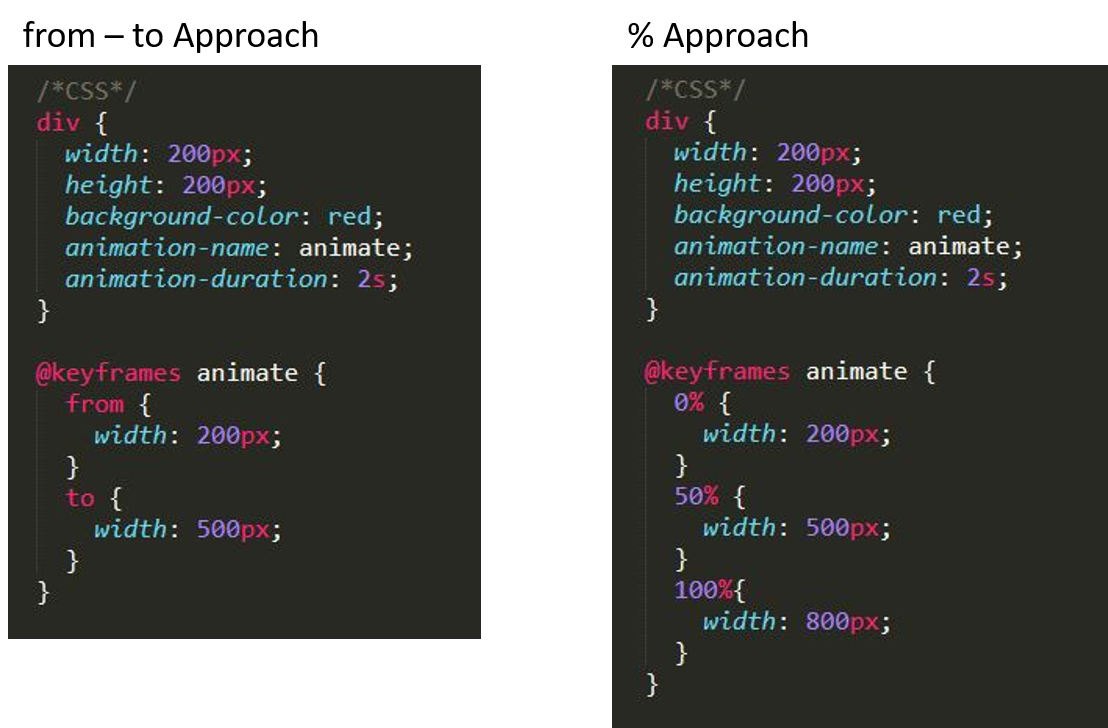
animation property ကို အသုံးျပဳမယ္ဆိုရင္ @keyframes animation-name ဆိုၿပီး ေၾကညာၿပီးမွ အသုံးျပဳရပါမယ္။ @keyframes ထဲမွာ element ကို ဘယ္ပုံစံကေန ဘယ္ပုံစံ ေျပာင္းလဲမယ္ဆိုၿပီး သတ္မွတ္ေပးလို႔ ရပါတယ္။ အဲ့လို သတ္မွတ္တဲ့ေနရာမွာ from – to approach နဲ႔ % approach ဆိုၿပီး ပုံစံ(၂)မ်ိဳး ရွိပါတယ္။
animation တစ္ခု အခ်ိန္ ဘယ္ေလာက္ၾကာမယ္ဆိုတာကို animation-duration နဲ႔ သတ္မွတ္ပါတယ္။
animation ကို အခ်ိန္ဘယ္ေလာက္ေနမွ စမယ္ဆိုတာ သတ္မွတ္တဲ့အခါ animation-delay ကို အသုံးျပဳၾကပါတယ္။
animation-count ကေတာ့ animation ကို ဘယ္ႏွစ္ႀကိမ္ျပဳလုပ္မလဲဆိုတာ သတ္မွတ္ေပးပါတယ္။
animation-direction ကေတာ့ animation ျဖစ္စဥ္ကို ဘယ္လိုအစီအစဥ္နဲ႔ သြားမလဲဆိုတာ ဆုံးျဖတ္ပါတယ္။ animation-direction အတြက္ အသုံးျပဳလို႔ရတဲ့ values (၄) ခု ရွိပါတယ္။ values ေတြ ဘယ္လိုအလုပ္လုပ္လဲဆိုတာ ဥပမာနဲ႔ ရွင္းျပပါမယ္။
animation အတြက္ @keyframes ကို from-to approach နဲ႔ ေရးထားတယ္ ဆိုပါစို႔
forwards က from – to ပုံစံအတိုင္း အလုပ္လုပ္ပါတယ္။
backwards က to – from ပုံစံအတိုင္း အလုပ္လုပ္ပါတယ္။
alternate ကေတာ့ from – to – from ပုံစံအတိုင္း အလုပ္လုပ္ပါတယ္။
alternate-reverse ကေတာ့ to-from-to ပုံစံအတိုင္း အလုပ္လုပ္ပါတယ္။
animation-timing-function ကေတာ့ animation တစ္ခုအတြင္း ျဖစ္ေပၚမယ့္ speed curve ကို သတ္မွတ္ေပးပါတယ္။ animation-timing-function မွာလည္း linear, ease, ease-in, ease-out, ease-in-out ဆိုၿပီး ရွိပါတယ္။ ဘယ္လိုကြာျခားလဲဆိုတာ https://cubic-bezier.com/ မွာ ေလ့လာၾကည့္ရႈႏိုင္ၿပီး ကိုယ္ႏွစ္သက္သည့္ speed curve တစ္ခု ဖန္တီးႏိုင္ပါတယ္။
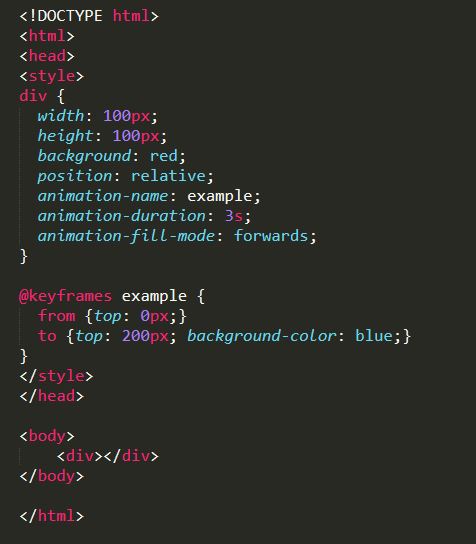
animation-fill-mode ကေတာ့ animation တစ္ခု မစတင္ခင္ ဒါမွမဟုတ္ ၿပီးဆုံးသြားတဲ့အခါ element ကို ဘယ္လို style နဲ႔ စတင္ေစခ်င္လဲ က်န္ရွိေစခ်င္လဲဆိုတာအတြက္ အသုံးဝင္ပါတယ္။ coding အရ ၾကည့္မယ္ဆို ပိုသိသာတဲ့အတြက္ sample coding ထည့္ထားေပးပါတယ္။
Transform
transform က element ေတြကို လႈပ္ရွားမႈမပါဘဲ ပုံပန္းသြင္ျပင္အရေျပာင္းလဲေပးပါတယ္။ transform မွာ translate(), rotate(), scale() စတဲ့ method ေတြကို အသုံးျပဳပါတယ္။ translate() က element ေတြကို x-axis/y-axis အတိုင္း ေနရာေ႐ြ႕ဖို႔ အသုံးျပဳၾကပါတယ္။ rotate() ကေတာ့ element ေတြကို ကိုယ္ေပးတဲ့ degree အလိုက္ လွည့္ေပးပါတယ္။ scale() ကို element ေတြရဲ႕ size အတိုးအေလ်ာ့ လုပ္ခ်င္တဲ့အခါ အသုံးျပဳၾကပါတယ္။
Transition
transition ကေတာ့ element ေတြ state တစ္ခုကေန တစ္ခုကို ေျပာင္းလဲသြားတဲ့အခါမ်ိဳးမွာ ေျပာင္းလဲမႈကို smoothly ျဖစ္ေအာင္ လုပ္ေဆာင္ေပးပါတယ္။
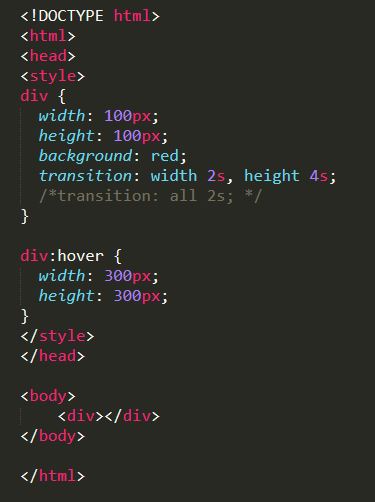
*element ေတြ state တစ္ခုကေန တစ္ခု ေျပာင္းတဲ့အခ်ိန္မွာ ျဖစ္ေပၚတဲ့ ေျပာင္းလဲမႈေတြက တစ္ခုထက္ ပိုမယ္ ၿပီးေတာ့ duration တူမယ္ဆိုရင္ ေျပာင္းလဲသြားတဲ့ properties ေတြအစား all ဆိုၿပီး ၿခဳံငုံေရးလို႔ ရပါတယ္။
ဒီေန႔ ညီမ မွ်ေဝေပးခဲ့ CSS properties ေတြကို ေလ့လာၿပီး အက်ိဳးရွိသြားမယ္လို႔ ေမွ်ာ္လင့္ပါတယ္ရွင့္။ အခ်ိန္ေပး ဖတ္ရႈေပးတဲ့အတြက္ ေက်းဇူးတင္ပါတယ္။